
Graviro
Lasso
Lasso app icon
A Graviro utility for macOS

Select anything. Do the next thing.

Press a shortcut, draw around anything on your screen, and Lasso offers the action that fits — add the event, copy the table, open the address, blur the card number. Analysis happens on your Mac.

Soon

Coming soon to the Mac App Store · Free · macOS 26 and later · Apple silicon · English, Español, Português

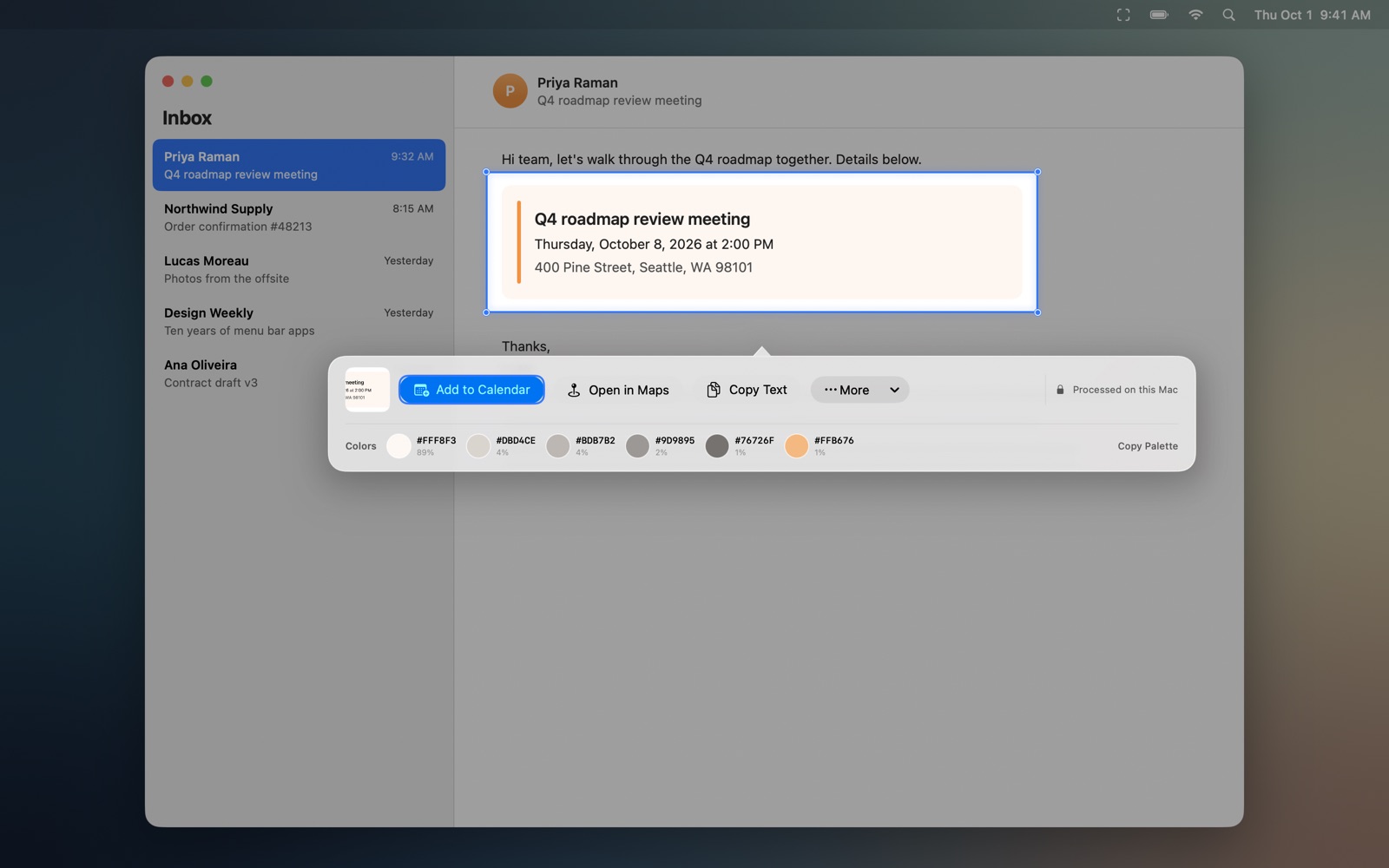
An event in an email selected with Lasso, with an action bar offering Add to Calendar, Copy Text and Open in Maps
Control–Shift–Space, then drawProcessed on this Mac
What it does

Content you can see, finally usable.

Screenshots, video calls, remote desktops, PDFs and apps that never made their text easy to copy.

Events

Invitations into Calendar.

Dates, times and places are extracted for you to review before anything is created.

Tables

Rows and columns, rebuilt.

Copy a table from an image as CSV, TSV or Markdown.

Redaction

Sensitive details, covered.

Blur or block names, emails, phone numbers and card numbers before you share.

Errors

Clean messages, explained.

Copy an error without the noise, or get an explanation from the model on your Mac.

Places

Addresses and parcels.

Open an address in Maps or Waze, and track UPS, FedEx, USPS and DHL Express shipments.

More

And the small jobs.

Receipts, QR codes, contacts, reminders, translation, unit and time-zone conversion, JSON, and colour palettes.

How it works

Three steps, no window.

01Press Control–Shift–Space, or choose New Lasso from the menu bar.
02Draw around what you need, on any display.
03Pick the recommended action, or press 1–5 for the others. The bar disappears when you are done.
Private by design

What you capture stays on your Mac.

Text recognition, detection and explanations run on device. Selections live in memory only while the action bar is open, and there is no capture history.

Anonymous usage analytics

Lasso reports which features are used — never what you select. No account, no location, no IP address kept. Turn it off in Settings → Privacy at any time.

Read the privacy policy

Questions

Before you install.

Anything else, support answers within a working day.

Why does it ask for Screen Recording?

macOS requires it to read pixels from the screen. Lasso captures only the area you deliberately draw around.

Where does it live?

In the menu bar. It stays out of the Dock and Command–Tab until you call it.

Will it add things to my calendar on its own?

No. Events, contacts and reminders are created only after you review the extracted fields and confirm.

Can I teach it my own formats?

Yes. Custom Parser Packs are small JSON rules you write or import. They can copy templated text or open an HTTPS link, and nothing else.

Stop retyping what is already on your screen.

Free on the Mac App Store, soon.

Soon